# more /etc/sysconfig/network-scripts/ifcfg-eth0
HWADDR=00:50:56:XX:XX:XX
NAME=eth0
DNS1=192.168.xxx.xxx
DNS2=10.82.xxx.xxx
DOMAIN="midominio.com"
DEVICE=eth0
ONBOOT=yes
USERCTL=no
BOOTPROTO=none
check_link_down() {
return 1;
}
TYPE=Ethernet
DEFROUTE=yes
IPV4_FAILURE_FATAL=no
IPV6INIT=no
UUID=5fb06bd0-0bb0-7ffb-45f1-d6edd65xxxxx
IPADDR=10.150.xxx.xxx
PREFIX=16
GATEWAY=10.150.yyy.yyy
# nmcli con mod eth0 ipv4.gateway 10.150.zzz.zzz
# nmcli con up eth0
Connection successfully activated (D-Bus active path: /org/freedesktop/NetworkManager/ActiveConnection/2)
# ip r
default via 10.150.zzz.zzz dev eth0 proto static metric 100
10.150.0.0/16 dev eth0 proto kernel scope link src 10.150.xxx.xxx metric 100
miércoles, 15 de junio de 2016

Modificar la precedencia de IPv6 a IPv4
Nota: Para cambiar la precedencia de IPv6 por IPv4 tenemos que crear (si no existe) el fichero /etc/gai.conf
# vi /etc/gai.conf
precedence ::ffff:0:0/96 10
POR
precedence ::ffff:0:0/96 100
Si cambiamos la el valor 10 por 100 IPv4 tendra precedencia a IPv6. Esto soluciona problemas como que un Apache Tomcat resuelva el localhost de IPv6 antes que el de IPv4
Ver nota: Prefer IPv4 over IPv6 in dual-stack environment (http://sf-alpha.bjgang.org/wordpress/2012/08/linux-prefer-ipv4-over-ipv6-in-dual-stack-environment-and-prevent-problems-when-only-ipv4-exists/)
# vi /etc/gai.conf
precedence ::ffff:0:0/96 10
POR
precedence ::ffff:0:0/96 100
Si cambiamos la el valor 10 por 100 IPv4 tendra precedencia a IPv6. Esto soluciona problemas como que un Apache Tomcat resuelva el localhost de IPv6 antes que el de IPv4
Ver nota: Prefer IPv4 over IPv6 in dual-stack environment (http://sf-alpha.bjgang.org/wordpress/2012/08/linux-prefer-ipv4-over-ipv6-in-dual-stack-environment-and-prevent-problems-when-only-ipv4-exists/)
Boot en Single User Red Hat 7
Durante el proceso de boot, en el GRUB ejecutamos e
GRUB: e
Buscamos el texto rhgb quiet y lo reemplazamos con init=/bin/bash
linuxefi ...... rhgb quiet -> init=/bin/bash
Presionamos ctrl+x para finalizar la edision.
ctrl+x
Montamos el FS de root como RW
# mount -o remount,rw /
... REALIZAMOS EL MANTENIMIENTO...
Ej:
# passwd root
[Enter New Password]
[Re-enter New Password]
Para finalizar ejecutamos un relabel del contexto de SELinux
# touch /.autorelabel
Arrancamos el equipo
# exec /sbin/init
GRUB: e
Buscamos el texto rhgb quiet y lo reemplazamos con init=/bin/bash
linuxefi ...... rhgb quiet -> init=/bin/bash
Presionamos ctrl+x para finalizar la edision.
ctrl+x
Montamos el FS de root como RW
# mount -o remount,rw /
... REALIZAMOS EL MANTENIMIENTO...
Ej:
# passwd root
[Enter New Password]
[Re-enter New Password]
Para finalizar ejecutamos un relabel del contexto de SELinux
# touch /.autorelabel
Arrancamos el equipo
# exec /sbin/init
Procedimiento para habilitar acceso via SSH/SFTP sin Password a un host remoto
Nos logueamos con el usuario que realizara la conexion
root # su - miusuario
miusuario $ cd ~/.ssh
miusuario $ vi config
Host remotehost
HostName remotehost
User sftp_globalia
IdentityFile ~/.ssh/id_rsa
miusuario $ sftp remotehost
Connected to remotehost.
sftp> ls -la
drwxr-xr-x 5 0 0 4096 Nov 27 08:03 .
drwxr-xr-x 5 0 0 4096 Nov 27 08:03 ..
drwx------ 2 1087 1087 4096 Nov 27 08:14 .ssh
drwxrwx--- 6 1087 1087 4096 May 12 00:00 input
drwxrwx--- 6 1087 1087 4096 May 12 00:00 output
sftp> quit
root # su - miusuario
miusuario $ cd ~/.ssh
miusuario $ vi config
Host remotehost
HostName remotehost
User sftp_globalia
IdentityFile ~/.ssh/id_rsa
miusuario $ sftp remotehost
Connected to remotehost.
sftp> ls -la
drwxr-xr-x 5 0 0 4096 Nov 27 08:03 .
drwxr-xr-x 5 0 0 4096 Nov 27 08:03 ..
drwx------ 2 1087 1087 4096 Nov 27 08:14 .ssh
drwxrwx--- 6 1087 1087 4096 May 12 00:00 input
drwxrwx--- 6 1087 1087 4096 May 12 00:00 output
sftp> quit
Assembling Partitions as RAID Devices
Instalamos el SW
# yum install -y mdadm
o
# apt-get install mdadm
Creamos el RAID
# mdadm --create --verbose /dev/md0 --level=mirror --raid-devices=2 /dev/sdb1 /dev/sdc1
mdadm: size set to 96128K
mdadm: Defaulting to version 1.2 metadata
mdadm: array /dev/md0 started.
Nota: that if the partitions you are using contain file systems, you are prompted to
confirm your intention to use them in a RAID device.
Verificamos el estado del mismo
# mdadm --detail /dev/md0
/dev/md0:
Version : 1.2
...
Number Major Minor RaidDevice State
0 8 17 0 active sync /dev/sdb1
1 8 33 1 active sync /dev/sdc1
Verificamos los diferentes raids detectados
# mdadm --detail --scan
ARRAY /dev/md/0 metadata=1.2 name=localhost.localdomain:0 UUID=5fd97b87:18209d2d:ac07e389:4fb93cfe
Actualizamos el archivo de configuracion
# mdadm --detail --scan >> /etc/mdadm/mdadm.conf
Operating systems using SystemD:
# systemctl start mdmonitor (or alternatively, mdmonitor.service)
# systemctl enable mdmonitor
Operating systems using SysVinit:
# service mdmonitor start
# chkconfig mdmonitor on
# yum install -y mdadm
o
# apt-get install mdadm
Creamos el RAID
# mdadm --create --verbose /dev/md0 --level=mirror --raid-devices=2 /dev/sdb1 /dev/sdc1
mdadm: size set to 96128K
mdadm: Defaulting to version 1.2 metadata
mdadm: array /dev/md0 started.
Nota: that if the partitions you are using contain file systems, you are prompted to
confirm your intention to use them in a RAID device.
Verificamos el estado del mismo
# mdadm --detail /dev/md0
/dev/md0:
Version : 1.2
...
Number Major Minor RaidDevice State
0 8 17 0 active sync /dev/sdb1
1 8 33 1 active sync /dev/sdc1
Verificamos los diferentes raids detectados
# mdadm --detail --scan
ARRAY /dev/md/0 metadata=1.2 name=localhost.localdomain:0 UUID=5fd97b87:18209d2d:ac07e389:4fb93cfe
Actualizamos el archivo de configuracion
# mdadm --detail --scan >> /etc/mdadm/mdadm.conf
Operating systems using SystemD:
# systemctl start mdmonitor (or alternatively, mdmonitor.service)
# systemctl enable mdmonitor
Operating systems using SysVinit:
# service mdmonitor start
# chkconfig mdmonitor on
Eliminar Mensaje "kernel:BUG: soft lockup" en Linux RHEL7
Verificar si se produce el evento de "kernel:BUG: soft lockup"
# dmesg | grep soft
Verificar el limite utilizado por el watchdog
# cat /proc/sys/kernel/watchdog_thresh
60
Cambio en caliente del limite utilizado
echo 60 > /proc/sys/kernel/watchdog_thresh
Cambio en permanente del limite utilizado
# vi /etc/sysctl.conf
kernel.watchdog_thresh = 60
Informacion adisional
Voz sobre IP, Mini SIP Server (Simpe, potente y fiable)
Buenas nuevamente después de tanto tiempo!!!
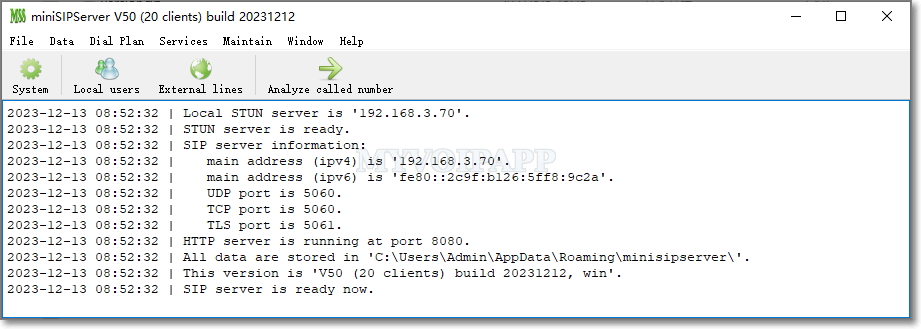
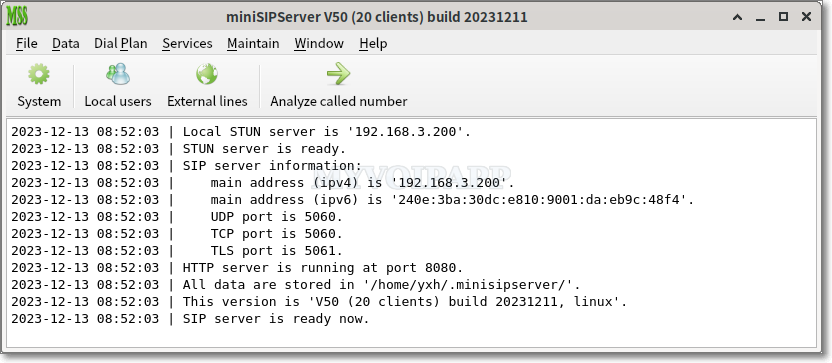
Recientemente, tuve la necesidad de instalarme un server SIP, la verdad hace tiempo incursione con Asterix y otros productos la mayoría muy buenos pero difíciles de configurar. Luego encontré miniSIPServer que es multiplataforma, se puede obtener una licencia free (*) del producto y prácticamente con cero configuración.
La verdad es que el producto es muy bueno y simple de gestionar, quien este buscando algo similar free o de bajo coste, no duden en probar este producto.
Mas Info:
Site : https://www.myvoipapp.com
Download: https://www.myvoipapp.com/download/
Features: https://www.myvoipapp.com/minisipserver/index.html
* License : https://www.myvoipapp.com/blog/tag/free/
Mariano
Recientemente, tuve la necesidad de instalarme un server SIP, la verdad hace tiempo incursione con Asterix y otros productos la mayoría muy buenos pero difíciles de configurar. Luego encontré miniSIPServer que es multiplataforma, se puede obtener una licencia free (*) del producto y prácticamente con cero configuración.
La verdad es que el producto es muy bueno y simple de gestionar, quien este buscando algo similar free o de bajo coste, no duden en probar este producto.
Main window (Windows)
Main window (Linux)
Mas imágenes en https://www.myvoipapp.com/minisipserver/screens.html
Mas Info:
Site : https://www.myvoipapp.com
Download: https://www.myvoipapp.com/download/
Features: https://www.myvoipapp.com/minisipserver/index.html
* License : https://www.myvoipapp.com/blog/tag/free/
Mariano
lunes, 14 de junio de 2010
Script "showomem.pl" - Analiza la memoria de los procesos de Oracle
Quien no se pregunto en algún momento cual de todos estos procesos de Oracle es el que esta consumiendo toda la memoria de mi equipo! Bueno con este script podremos darle mas herramientas a los DBAs para que encuentren el problema.
PRUEBA:
root@xxx # showomem -t
PID PRIVATE SHARED TOTAL ARGUMENTOS
------------------------------------------------------------------------------------------
7791 226.31 Mb 96.77 Mb 323.08 Mb oracleORAXXX (LOCAL=NO)
23810 98.20 Mb 96.77 Mb 194.96 Mb oracleORAXXX (LOCAL=NO)
20730 59.76 Mb 96.77 Mb 156.52 Mb oracleORAXXX (LOCAL=NO)
4310 46.16 Mb 96.77 Mb 142.93 Mb oracleORAXXX (LOCAL=NO)
13012 41.25 Mb 96.77 Mb 138.02 Mb oracleORAXXX (LOCAL=NO)
28768 33.07 Mb 96.77 Mb 129.84 Mb oracleORAXXX (LOCAL=NO)
21377 29.06 Mb 96.77 Mb 125.83 Mb oracleORAXXX (LOCAL=NO)
7098 26.01 Mb 96.77 Mb 122.77 Mb oracleORAXXX (LOCAL=NO)
21780 25.84 Mb 96.77 Mb 122.61 Mb oracleORAXXX (LOCAL=NO)
1471 25.13 Mb 96.77 Mb 121.90 Mb oracleORAXXX (LOCAL=NO)
28737 19.52 Mb 96.77 Mb 116.29 Mb oracleORAXXX (LOCAL=NO)
17914 18.08 Mb 96.77 Mb 114.84 Mb oracleORAXXX (LOCAL=NO)
15492 17.62 Mb 96.77 Mb 114.38 Mb oracleORAXXX (LOCAL=NO)
9353 17.58 Mb 96.77 Mb 114.34 Mb oracleORAXXX (LOCAL=NO)
17860 17.45 Mb 96.77 Mb 114.22 Mb oracleORAXXX (LOCAL=NO)
16449 17.08 Mb 96.77 Mb 113.84 Mb oracleORAXXX (LOCAL=NO)
24159 16.26 Mb 96.77 Mb 113.02 Mb oracleORAXXX (LOCAL=NO)
27255 17.09 Mb 62.55 Mb 79.65 Mb oracleORAXXX (LOCAL=NO)
18547 16.09 Mb 62.55 Mb 78.64 Mb oracleORAXXX (LOCAL=NO)
13073 16.05 Mb 62.55 Mb 78.61 Mb oracleORAXXX (LOCAL=NO)
8056 15.96 Mb 62.55 Mb 78.52 Mb oracleORAXXX (LOCAL=NO)
24410 15.63 Mb 62.55 Mb 78.19 Mb oracleORAXXX (LOCAL=NO)
25677 15.62 Mb 62.55 Mb 78.18 Mb oracleORAXXX (LOCAL=NO)
24387 15.28 Mb 62.55 Mb 77.84 Mb oracleORAXXX (LOCAL=NO)
18138 15.27 Mb 62.55 Mb 77.83 Mb oracleORAXXX (LOCAL=NO)
Como podemos ver, el pid 7791 es susceptible de analizar por el consumo que muestra.
SCRIPT:
#!/usr/bin/perl
# *********************************************************************** #
# #
# SCRIPT: showomem #
# AUTHOR: mariano.obarrio@gmail.com #
# DATE: 11/05/10 #
# REV: 0.1 #
# #
# PLATFORM: Solaris 10 #
# #
# PROPOSITO: Analizar la memoria de los procesos de Oracle. #
# #
# ESTE ESCRIPT ES LLAMADO DESDE: #
# #
# Linea de comando #
# #
# #
# EXIT CODES: #
# #
# NOTE: You must have root privileges to execute this script. #
# #
# Historico: #
# 11/05/2010 Rev. 0.1 #
# Mariano -> Listado de ORACLE_SID #
# -> Opciones -a -q #
# 10/06/2010 -> Opcion -t #
# #
# *********************************************************************** #
use Switch;
use Getopt::Std;
use IO;
getopts("p:s:d:hlaqt", \%args);
my $DEBUG = ($args{d}?$args{d}:0);
my $all = ($args{a}?1:0);
my $osid = ($args{s}?$args{s}:"ALL");
my $pid = ($args{p}?$args{p}:-1);
my $Pmap = "/usr/bin/pmap";
my $Grep = "/usr/bin/grep";
my $Egrep = "/usr/bin/egrep";
my $Awk = "/usr/bin/awk";
my $Ps = "/usr/bin/ps";
my $Ps2 = "/usr/ucb/ps";
my $Sort = "/usr/bin/sort";
my $TotPriv = 0;
my $TotShar = 0;
my $Total = 0;
if($args{h}){ usage(); exit; }
print "DEBUG : ON LEVEL: [$DEBUG]\n" if($DEBUG>=1);
print "PID : $pid\n" if($DEBUG>=1);
print "ORACLE_SID : $osid\n" if($DEBUG>=1);
if($args{l}) { ShowSIDs(); exit; }
if($args{t}) {
printf(" PID PRIVATE SHARED TOTAL ARGUMENTOS\n");
print "-"x90 if(!$args{q});
print "\n" if(!$args{q});
my $ps2cmd = "$Ps2 -auxw|sort -k4nr|head -25|awk \'{print \$2}\'";
@psout = qx($ps2cmd);
foreach $pid (@psout)
{
chomp($pid);
($PidPriv,$PidShar,$Gtotal) = split(/:/,ShowByPID($pid));
$argumentos = `$Ps -fo args -p $pid|grep -v COMMAND`;
chomp($argumentos);
#$argumentos =~ s/(\d)+(\s)//;
#$argumentos =~ s/^\s+//;
printf("%12d %12.2f Mb %12.2f Mb %12.2f Mb %s\n",$pid,$PidPriv,$PidShar,$Gtotal,$argumentos);
}
}
if($pid != -1)
{
($PidPriv,$PidShar,$Gtotal) = split(/:/,ShowByPID($pid));
print "-"x35 if(!$args{q});
print "\n" if(!$args{q});
print "Non Shared Memory by PID\n" if(!$args{q});
print "-"x35 if(!$args{q});
print "\n" if(!$args{q});
printf("Pid : %12d\nPrivate : %12.2f Mb\nShared : %12.2f Mb\n",$pid,$PidPriv,$PidShar);
printf("Total : %12.2f Mb\n",$Gtotal);
print "-"x35 if(!$args{q});
print "\n" if(!$args{q});
printf("Verify : ps -ef |egrep -i $pid|grep -v grep\n") if(!$args{q});
#printf("KILL : kill -9 $pid\n");
print "-"x35 if(!$args{q});
print "\n";
}
else { ShowByOSID($osid) if($osid !~ /ALL/); }
;
sub ShowSIDs
{
print "-"x35 if(!$args{q});
print "\n" if(!$args{q});
print "Listado de los SIDs disponibles\n" if(!$args{q});
print "-"x35 if(!$args{q});
print "\n" if(!$args{q});
my $pmapcmd = "$Ps -efo args|$Grep _smon_|$Grep -v grep|$Sort -u";
@psout = qx($pmapcmd);
foreach $line (@psout)
{
$line =~ s/.*_//g;
print $line;
}
print "-"x35 if(!$args{q});
print "\n" if(!$args{q});
}
sub ShowByOSID
{
my $osid = shift;
print "Procesando por SID\n" if($DEBUG>=1);
print "-"x83 if(!$args{q});
print "\n" if(!$args{q});
print "Non Shared Memory by ORACLE_SID\n" if(!$args{q});
print "-"x83 if(!$args{q});
print "\n" if(!$args{q});
print " Pid ORACLE_SID Private Shared Total\n";
print "-"x83 if(!$args{q});
print "\n" if(!$args{q});
my $pmapcmd = "$Ps -ef";
@psout = qx($pmapcmd);
foreach $line (@psout)
{
chomp($line);
if($args{a}){ $string = "oracle${osid}"; }
else { $string = "oracle${osid}.*LOCAL=NO"; }
if($line =~ m/$string/)
{
# oracle 6038 1 0 09:01:27 ? 0:01 oracleDNEWTESE (LOCAL=NO)
$line =~ s/\ +/\ /g;
$line =~ s/^\ //;
($nada,$pid,$nada) = split(/ /,$line,3);
($PidPriv,$PidShar,$Gtotal) = split(/:/,ShowByPID($pid));
$TotPriv += $PidPriv;
$TotShar += $PidShar;
$Total += $Gtotal;
printf("%10d %17s %12.2f Mb %12.2f Mb %12.2f Mb\n",$pid,$osid,$PidPriv,$PidShar,$Gtotal);
}
}
print "-"x83 if(!$args{q});
print "\n" if(!$args{q});
printf(" %17s %12.2f Mb %12.2f Mb %12.2f Mb\n",$osid,$TotPriv,$TotShar,$Total);
print "-"x83 if(!$args{q});
print "\n" if(!$args{q});
}
sub ShowByPID
{
my $pid = shift;
my $PidPriv = 0;
my $PidShar = 0;
my $Gtotal = 0;
my $pmapcmd = "$Pmap $pid 2>/dev/null";
# read/write
@pmapout = qx($pmapcmd);
foreach $line (@pmapout)
{
chomp($line); # no newline
$line =~ s/K//g;
if($line =~ m/r-x../)
{
$line =~ s/.*(\ )(\d+)(\ ).*$/$2/g;
$PidShar += $line;
next;
}
next if($line =~ m/shmid/);
if($line =~ m/rw.../)
{
$line =~ s/.*(\ )(\d+)(\ ).*$/$2/g;
$PidPriv += $line;
}
}
$PidPriv = $PidPriv/1024;
$PidShar = $PidShar/1024;
$Gtotal = $PidPriv + $PidShar;
return("$PidPriv:$PidShar:$Gtotal");
}
sub PrivShMem
{
my $pid = shift;
my $PidPriv = 0;
my $pmapcmd = "$Pmap $pid | $Grep 'rw...' | $Grep -v shmid | $Awk \'{print \$2}\' | $Awk -FK \'{print \$1}\'";
# read/write
@pmapout = qx($pmapcmd);
foreach $line (@pmapout)
{
chomp($line); # no newline
$PidPriv += $line;
}
return(($PidPriv/1024));
}
sub TotShMem
{
my $pid = shift;
my $PidShar = 0;
my $pmapcmd = "$Pmap $pid | $Grep 'r-x..' | $Awk \'{print \$2}\' | $Awk -FK \'{print \$1}\'";
#read/exec
@pmapout = qx($pmapcmd);
foreach $line (@pmapout)
{
chomp($line); # no newline
$PidShar += $line;
}
return(($PidShar/1024));
}
sub usage{
print "Usage:\n";
print "\n";
print "$0 -h \n";
print " -h: Help\n";
print " -a: All Oracle Process.\n";
print " -l: Lista SIDs Disponibles\n";
print " -p: PID\n";
print " -t: Top 25 de consumo\n";
print " -s: ORACLE_SID\n";
print "\nEj.: $0 -p 3166\n\n";
exit;
}
PRUEBA:
root@xxx # showomem -t
PID PRIVATE SHARED TOTAL ARGUMENTOS
------------------------------------------------------------------------------------------
7791 226.31 Mb 96.77 Mb 323.08 Mb oracleORAXXX (LOCAL=NO)
23810 98.20 Mb 96.77 Mb 194.96 Mb oracleORAXXX (LOCAL=NO)
20730 59.76 Mb 96.77 Mb 156.52 Mb oracleORAXXX (LOCAL=NO)
4310 46.16 Mb 96.77 Mb 142.93 Mb oracleORAXXX (LOCAL=NO)
13012 41.25 Mb 96.77 Mb 138.02 Mb oracleORAXXX (LOCAL=NO)
28768 33.07 Mb 96.77 Mb 129.84 Mb oracleORAXXX (LOCAL=NO)
21377 29.06 Mb 96.77 Mb 125.83 Mb oracleORAXXX (LOCAL=NO)
7098 26.01 Mb 96.77 Mb 122.77 Mb oracleORAXXX (LOCAL=NO)
21780 25.84 Mb 96.77 Mb 122.61 Mb oracleORAXXX (LOCAL=NO)
1471 25.13 Mb 96.77 Mb 121.90 Mb oracleORAXXX (LOCAL=NO)
28737 19.52 Mb 96.77 Mb 116.29 Mb oracleORAXXX (LOCAL=NO)
17914 18.08 Mb 96.77 Mb 114.84 Mb oracleORAXXX (LOCAL=NO)
15492 17.62 Mb 96.77 Mb 114.38 Mb oracleORAXXX (LOCAL=NO)
9353 17.58 Mb 96.77 Mb 114.34 Mb oracleORAXXX (LOCAL=NO)
17860 17.45 Mb 96.77 Mb 114.22 Mb oracleORAXXX (LOCAL=NO)
16449 17.08 Mb 96.77 Mb 113.84 Mb oracleORAXXX (LOCAL=NO)
24159 16.26 Mb 96.77 Mb 113.02 Mb oracleORAXXX (LOCAL=NO)
27255 17.09 Mb 62.55 Mb 79.65 Mb oracleORAXXX (LOCAL=NO)
18547 16.09 Mb 62.55 Mb 78.64 Mb oracleORAXXX (LOCAL=NO)
13073 16.05 Mb 62.55 Mb 78.61 Mb oracleORAXXX (LOCAL=NO)
8056 15.96 Mb 62.55 Mb 78.52 Mb oracleORAXXX (LOCAL=NO)
24410 15.63 Mb 62.55 Mb 78.19 Mb oracleORAXXX (LOCAL=NO)
25677 15.62 Mb 62.55 Mb 78.18 Mb oracleORAXXX (LOCAL=NO)
24387 15.28 Mb 62.55 Mb 77.84 Mb oracleORAXXX (LOCAL=NO)
18138 15.27 Mb 62.55 Mb 77.83 Mb oracleORAXXX (LOCAL=NO)
Como podemos ver, el pid 7791 es susceptible de analizar por el consumo que muestra.
SCRIPT:
# *********************************************************************** #
# #
# SCRIPT: showomem #
# AUTHOR: mariano.obarrio@gmail.com #
# DATE: 11/05/10 #
# REV: 0.1 #
# #
# PLATFORM: Solaris 10 #
# #
# PROPOSITO: Analizar la memoria de los procesos de Oracle. #
# #
# ESTE ESCRIPT ES LLAMADO DESDE: #
# #
# Linea de comando #
# #
# #
# EXIT CODES: #
# #
# NOTE: You must have root privileges to execute this script. #
# #
# Historico: #
# 11/05/2010 Rev. 0.1 #
# Mariano -> Listado de ORACLE_SID #
# -> Opciones -a -q #
# 10/06/2010 -> Opcion -t #
# #
# *********************************************************************** #
use Switch;
use Getopt::Std;
use IO;
getopts("p:s:d:hlaqt", \%args);
my $DEBUG = ($args{d}?$args{d}:0);
my $all = ($args{a}?1:0);
my $osid = ($args{s}?$args{s}:"ALL");
my $pid = ($args{p}?$args{p}:-1);
my $Pmap = "/usr/bin/pmap";
my $Grep = "/usr/bin/grep";
my $Egrep = "/usr/bin/egrep";
my $Awk = "/usr/bin/awk";
my $Ps = "/usr/bin/ps";
my $Ps2 = "/usr/ucb/ps";
my $Sort = "/usr/bin/sort";
my $TotPriv = 0;
my $TotShar = 0;
my $Total = 0;
if($args{h}){ usage(); exit; }
print "DEBUG : ON LEVEL: [$DEBUG]\n" if($DEBUG>=1);
print "PID : $pid\n" if($DEBUG>=1);
print "ORACLE_SID : $osid\n" if($DEBUG>=1);
if($args{l}) { ShowSIDs(); exit; }
if($args{t}) {
printf(" PID PRIVATE SHARED TOTAL ARGUMENTOS\n");
print "-"x90 if(!$args{q});
print "\n" if(!$args{q});
my $ps2cmd = "$Ps2 -auxw|sort -k4nr|head -25|awk \'{print \$2}\'";
@psout = qx($ps2cmd);
foreach $pid (@psout)
{
chomp($pid);
($PidPriv,$PidShar,$Gtotal) = split(/:/,ShowByPID($pid));
$argumentos = `$Ps -fo args -p $pid|grep -v COMMAND`;
chomp($argumentos);
#$argumentos =~ s/(\d)+(\s)//;
#$argumentos =~ s/^\s+//;
printf("%12d %12.2f Mb %12.2f Mb %12.2f Mb %s\n",$pid,$PidPriv,$PidShar,$Gtotal,$argumentos);
}
}
if($pid != -1)
{
($PidPriv,$PidShar,$Gtotal) = split(/:/,ShowByPID($pid));
print "-"x35 if(!$args{q});
print "\n" if(!$args{q});
print "Non Shared Memory by PID\n" if(!$args{q});
print "-"x35 if(!$args{q});
print "\n" if(!$args{q});
printf("Pid : %12d\nPrivate : %12.2f Mb\nShared : %12.2f Mb\n",$pid,$PidPriv,$PidShar);
printf("Total : %12.2f Mb\n",$Gtotal);
print "-"x35 if(!$args{q});
print "\n" if(!$args{q});
printf("Verify : ps -ef |egrep -i $pid|grep -v grep\n") if(!$args{q});
#printf("KILL : kill -9 $pid\n");
print "-"x35 if(!$args{q});
print "\n";
}
else { ShowByOSID($osid) if($osid !~ /ALL/); }
;
sub ShowSIDs
{
print "-"x35 if(!$args{q});
print "\n" if(!$args{q});
print "Listado de los SIDs disponibles\n" if(!$args{q});
print "-"x35 if(!$args{q});
print "\n" if(!$args{q});
my $pmapcmd = "$Ps -efo args|$Grep _smon_|$Grep -v grep|$Sort -u";
@psout = qx($pmapcmd);
foreach $line (@psout)
{
$line =~ s/.*_//g;
print $line;
}
print "-"x35 if(!$args{q});
print "\n" if(!$args{q});
}
sub ShowByOSID
{
my $osid = shift;
print "Procesando por SID\n" if($DEBUG>=1);
print "-"x83 if(!$args{q});
print "\n" if(!$args{q});
print "Non Shared Memory by ORACLE_SID\n" if(!$args{q});
print "-"x83 if(!$args{q});
print "\n" if(!$args{q});
print " Pid ORACLE_SID Private Shared Total\n";
print "-"x83 if(!$args{q});
print "\n" if(!$args{q});
my $pmapcmd = "$Ps -ef";
@psout = qx($pmapcmd);
foreach $line (@psout)
{
chomp($line);
if($args{a}){ $string = "oracle${osid}"; }
else { $string = "oracle${osid}.*LOCAL=NO"; }
if($line =~ m/$string/)
{
# oracle 6038 1 0 09:01:27 ? 0:01 oracleDNEWTESE (LOCAL=NO)
$line =~ s/\ +/\ /g;
$line =~ s/^\ //;
($nada,$pid,$nada) = split(/ /,$line,3);
($PidPriv,$PidShar,$Gtotal) = split(/:/,ShowByPID($pid));
$TotPriv += $PidPriv;
$TotShar += $PidShar;
$Total += $Gtotal;
printf("%10d %17s %12.2f Mb %12.2f Mb %12.2f Mb\n",$pid,$osid,$PidPriv,$PidShar,$Gtotal);
}
}
print "-"x83 if(!$args{q});
print "\n" if(!$args{q});
printf(" %17s %12.2f Mb %12.2f Mb %12.2f Mb\n",$osid,$TotPriv,$TotShar,$Total);
print "-"x83 if(!$args{q});
print "\n" if(!$args{q});
}
sub ShowByPID
{
my $pid = shift;
my $PidPriv = 0;
my $PidShar = 0;
my $Gtotal = 0;
my $pmapcmd = "$Pmap $pid 2>/dev/null";
# read/write
@pmapout = qx($pmapcmd);
foreach $line (@pmapout)
{
chomp($line); # no newline
$line =~ s/K//g;
if($line =~ m/r-x../)
{
$line =~ s/.*(\ )(\d+)(\ ).*$/$2/g;
$PidShar += $line;
next;
}
next if($line =~ m/shmid/);
if($line =~ m/rw.../)
{
$line =~ s/.*(\ )(\d+)(\ ).*$/$2/g;
$PidPriv += $line;
}
}
$PidPriv = $PidPriv/1024;
$PidShar = $PidShar/1024;
$Gtotal = $PidPriv + $PidShar;
return("$PidPriv:$PidShar:$Gtotal");
}
sub PrivShMem
{
my $pid = shift;
my $PidPriv = 0;
my $pmapcmd = "$Pmap $pid | $Grep 'rw...' | $Grep -v shmid | $Awk \'{print \$2}\' | $Awk -FK \'{print \$1}\'";
# read/write
@pmapout = qx($pmapcmd);
foreach $line (@pmapout)
{
chomp($line); # no newline
$PidPriv += $line;
}
return(($PidPriv/1024));
}
sub TotShMem
{
my $pid = shift;
my $PidShar = 0;
my $pmapcmd = "$Pmap $pid | $Grep 'r-x..' | $Awk \'{print \$2}\' | $Awk -FK \'{print \$1}\'";
#read/exec
@pmapout = qx($pmapcmd);
foreach $line (@pmapout)
{
chomp($line); # no newline
$PidShar += $line;
}
return(($PidShar/1024));
}
sub usage{
print "Usage:\n";
print "\n";
print "$0 -h \n";
print " -h: Help\n";
print " -a: All Oracle Process.\n";
print " -l: Lista SIDs Disponibles\n";
print " -p: PID\n";
print " -t: Top 25 de consumo\n";
print " -s: ORACLE_SID\n";
print "\nEj.: $0 -p 3166\n\n";
exit;
}
viernes, 18 de septiembre de 2009
Tomar un Backup Online de un File System utilizando fssnap o UFSdump
1. Creamos el Snapshoot del FS (Verificar si hay espacio suficiente para la imagen)
# fssnap -F ufs -o bs=/soft/root.snap /
Para realizar este backup con UFSdump podemos realizar:
# fssnap -F ufs -o bs=/soft/root.snap /
2. Creamos el punto de montaje del snap
# mkdir /soft/rootfs
3. Montamos el snapshoot
# mount -F ufs -o ro /dev/fssnap/0 /soft/rootfs
4. Tomar el backup
# cd /soft/rootfs/
# tar cvf /dev/rmt/0 .
5. Desmontar el FS y borrar el snapshoot
# umount /soft/rootfs/
# rm /soft/root.snap
# fssnap -d /
Para realizar este backup con UFSdump podemos realizar:
1. Creamos el Snapshoot del FS (Verificar si hay espacio suficiente para la imagen)
# fssnap -F ufs -o bs=/soft/root.snap /
2. Tomamos el backup con UFSDUMP
# ufsdump 0cuf /dev/rmt/0 /dev/rfssnap/0
Nota: rfssnap -> RAW Device
fssnap -> Block Device
3. Borrar el snapshoot
# rm /soft/root.snap
# fssnap -d /
Agregar SWAP en solaris / Adding a Swap File on Solaris
Si se tiene solaris y es necesario agregar SWAP al equipo y no hay mas espacio disponible en el sistema, este es un procedimiento rapido sumar swap al sistema.
1. Usar el mkfile para crear un archivo del tamaño del swap que queremos incorporar y asi poder añadirlo al sistema. Por ejemplo vamos a crear un archivo de 1GB para incrementar el swap:
# /usr/sbin/mkfile 1024m /swap
Donde /swap es el nombre del archivo que se utilizara en el espacio de swap. Las unidades posibles para utilizar son kilobytes (k), bloques (b), o megabytes (m).
2. Vamos a decirle al sistema que comience a utilizar el archivo de swap que creamos:
# /usr/sbin/swap -a /swap
Para verificar que se añadio correctamente el SWAP en el equipo lo verificamos con el comando swap -l.
IMPORTANTE: Esta operatoria es momentanea y manual, despues de un reboot el equipo inicia de manera normal, con lo cual tendriamos que pensar en dos cosas, planificar el agregar mas swap incorporando otro disco o dejar permanentemente en el /etc/vfstab la incorporacion del archivo /swap.
SalU2,
Análisis de la memoria libre utilizando el SAR y el VMSTAT
VMSTAT (memory Report on usage of virtual and real memory.)
swap amount of swap space currently available (Kbytes)
free size of the free list (Kbytes)
swap amount of swap space currently available (Kbytes)
free size of the free list (Kbytes)
Esto quiere decir que el 'free0 es la cantidad de memoria RAM libre en kilobytes.
Ej.:
root@consola # vmstat 2 2
procs memory page disk faults cpu
r b w swap free re mf pi po fr de sr dd f0 s0 -- in sy cs us sy id
0 0 0 416184 72464 58 262 108 2 2 0 0 14 0 0 0 272 351 248 10 6 84
0 0 0 361808 59088 45 237 0 0 0 0 0 0 0 0 0 313 4843 284 26 5 69
SAR
$ man sar
-r Report unused memory pages and disk blocks:
freemem average pages available to user processes.
freeswap disk blocks available for page swapping.
La cantidad de memoria RAM libre en paginas es informada por el SAR -r, el tamanio de pagina utilizada se puede ver ejecutando el comando 'pagesize' generalmente es de 8k.
Ej.:
root@consola # sar -r 2 2
SunOS consola 5.8 Generic_117350-18 sun4u 06/28/06
10:22:21 freemem freeswap
10:22:23 7060 716848
10:22:25 7094 720432
Average 7077 718635
root@consola # pagesize
8192
root@consola # echo "7094 * 8" | bc
56752 <-- Memoria ram libre en K
y este valor es muy similar al reportado por el VMSTAT
root@consola # vmstat 2 2
procs memory page disk faults cpu
r b w swap free re mf pi po fr de sr dd f0 s0 -- in sy cs us sy id
0 0 0 416184 72464 58 262 108 2 2 0 0 14 0 0 0 272 351 248 10 6 84
0 0 0 361808 59088 45 237 0 0 0 0 0 0 0 0 0 313 4843 284 26 5 69
Expandir un File Systems utilizando SVM y growfs
1. Realizar un backup de los datos
2. Verificar el tamaño del File System
# df -k /filesystem
3. Verificar el tamaño del metadevice
# metastat -s [diskgroup] d611 |grep Size
4. Expandir el metadevice.
# metattach -s [diskgroup] d611 20g
5. Hacer crecer el file system.
# growfs -M /filesystem /dev/md/[diskgroup]/rdsk/d611
6. Verificar el tamaño del File System
# df -k /filesystem
7. Verificar el tamaño del metadevice
# metastat -s [diskgroup] d611 |grep Size
Nota 1: Si el file system no esta montado, la opción -M no es requerida.
Nota 2: Si el comando growfs es abortado, para recuperar cualquier espacio perdido se tendrá que desmontar el FS y ejecutar un fsck o volver a ejecutar el comando growfs.
SalU2,
Como realizar una copia de discos via "dd"
Ejemplo del procedimiento
# touch /reconfigure
# init 0
ok boot
# dd if=/dev/rdsk/c0t0d0s2 of=/dev/rdsk/c0t2d0s2 bs=128k
# fsck /dev/rdsk/c0t2d0s2
# mount /dev/dsk/c0t2d0s2 /mnt
# cd /mnt/etc
# vi vfstab
(Modificar las entradas para el nuevo disco)
# cd /
# umount /mnt
# init 0
# boot disk2 -s
# sys-unconfig
# boot disk2
Salu2,
Realizar un Ugrade via LiveUpgrade
Información complementaria
--------------------------
s10u1: Solaris 10 1/06
s10u2: Solaris 10 6/06
kilo: 192.168.1.2
infierno: 192.168.1.8
--------------------------
s10u1: Solaris 10 1/06
s10u2: Solaris 10 6/06
kilo: 192.168.1.2
infierno: 192.168.1.8
Slice Tag Version
------------------------------------------
c0t0d0s0 root Solaris 10u1 (Original)
c0t0d0s1 swap Solaris 10u1 (Original)
c0t1d0s0 root Solaris 10u2 (Actualizado)
c0t1d0s1 swap Solaris 10u2 (Actualizado)
DETALLE DEL PROCEDIMIENTO
-------------------------
01.- Mi server es una Netra T1 sin CDROM por esto comparto el DVD de instalacion de otra maquina.
root@infierno # share -o ro,anon=0 /cdrom/sol_10_606_sparc
02. Verificar desde el server que esta correctamente compartido
root@kilo # dfshares 192.168.1.8
RESOURCE SERVER ACCESS TRANSPORT
192.168.1.8:/cdrom/sol_10_606_sparc 192.168.1.8 - -
03. Clonar la tabla de particiones del disco a actualizar.
root@kilo # prtvtoc /dev/rdsk/c0t0d0s2 | fmthard -s - /dev/rdsk/c0t1d0s2
04. Eliminarl los paquetes de LiveUpgrade viejos
root@kilo # pkginfo |grep -i "Live Upgrade"
application SUNWlur Live Upgrade (root)
application SUNWlur.2 Live Upgrade 2.0 08/01 (root)
application SUNWluu Live Upgrade (usr)
application SUNWluzone Live Upgrade (zones support)
root@kilo # pkgrm SUNWluu SUNWlur SUNWlur.2 SUNWluzone
05. Instalar los paquetes de Live Upgrade del DVD de Solaris 10
(/cdrom/sol_10_606_sparc/Solaris_10/Product)
(/cdrom/sol_10_106_sparc/Solaris_10/Tools/Installers/liveupgrade20)
root@kilo # pkgadd SUNWluu SUNWlur SUNWluzone
06. Eliminar cualquier lista previa de Boot Enviroments
root@kilo # mv /etc/lutab /etc/lutab.original
07. Crear una copia del actual BE (Boot Environment)
root@kilo # lucreate -c s10u1 -m /:/dev/dsk/c0t1d0s0:ufs -m -:/dev/dsk/c0t1d0s1:swap -n s10u2
08. Verificar el estado de los BE (s10u1 y s10u2)
root@kilo # lustatus
Boot Environment Is Active Active Can Copy
Name Complete Now On Reboot Delete Status
-------------------------- -------- ------ --------- ------ ----------
s10u1 yes yes yes no -
s10u2 yes no no no -
09. Comenzar el Upgade al nuevo OS
root@kilo # luupgrade -u -n s10u2 -s /net/192.168.1.8/cdrom/sol_10_606_sparc
Validating the contents of the media </net/192.168.1.8/cdrom/sol_10_606_sparc>.
The media is a standard Solaris media.
The media contains an operating system upgrade image.
The media contains <Solaris> version <10>.
Constructing upgrade profile to use.
Locating the operating system upgrade program.
Checking for existence of previously scheduled Live Upgrade requests.
Creating upgrade profile for BE <s10u2>.
Determining packages to install or upgrade for BE <s10u2>.
Performing the operating system upgrade of the BE <s10u2>.
CAUTION: Interrupting this process may leave the boot environment unstable or unbootable.
Upgrading Solaris: 7% completed
...MIENTRAS TANTO EN OTRA SESION PODEMOS VERIFICAR LA ACTUALIZACION...
root@kilo # lustatus
Boot Environment Is Active Active Can Copy
Name Complete Now On Reboot Delete Status
-------------------------- -------- ------ --------- ------ ----------
s10u1 yes yes yes no -
s10u2 yes no no no UPDATING
...UN POCO MAS TARDE...
root@kilo # luupgrade -u -n s10u2 -s /net/192.168.1.8/cdrom/sol_10_606_sparc
Validating the contents of the media </net/192.168.1.8/cdrom/sol_10_606_sparc>.
The media is a standard Solaris media.
The media contains an operating system upgrade image.
The media contains <Solaris> version <10>.
Constructing upgrade profile to use.
Locating the operating system upgrade program.
Checking for existence of previously scheduled Live Upgrade requests.
Creating upgrade profile for BE <s10u2>.
Determining packages to install or upgrade for BE <s10u2>.
Performing the operating system upgrade of the BE <s10u2>.
CAUTION: Interrupting this process may leave the boot environment unstable or unbootable.
Upgrading Solaris: 100% completed
Installation of the packages from this media is complete.
Updating package information on boot environment <s10u2>.
Package information successfully updated on boot environment <s10u2>.
Adding operating system patches to the BE <s10u2>.
The operating system patch installation is complete.
INFORMATION: The file </var/sadm/system/logs/upgrade_log> on boot
environment <s10u2> contains a log of the upgrade operation.
INFORMATION: The file </var/sadm/system/data/upgrade_cleanup> on boot
environment <s10u2> contains a log of cleanup operations required.
INFORMATION: Review the files listed above. Remember that all of the files
are located on boot environment <s10u2>. Before you activate boot
environment <s10u2>, determine if any additional system maintenance is
required or if additional media of the software distribution must be installed.
The Solaris upgrade of the boot environment <s10u2> is complete.
root@kilo # lustatus
Boot Environment Is Active Active Can Copy
Name Complete Now On Reboot Delete Status
-------------------------- -------- ------ --------- ------ ----------
s10u1 yes yes yes no -
s10u2 yes no no yes -
10. Instalar los parches recomendados de solaris 10
root@kilo # unzip 10_Recommended.zip
root@kilo # cd /var/tmp/10_Recommended
root@kilo # luupgrade -n s10u2 -t -s . `cat patch_order`
Validating the contents of the media <.>.
The media contains 44 software patches that can be added.
Mounting the BE <s10u2>.
Adding patches to the BE <s10u2>.
Validating patches...
Loading patches installed on the system...
Done!
Loading patches requested to install.
......
Unmounting the BE <s10u2>.
The patch add to the BE <s10u2> completed.
11. Actival el nuevo Boot Environment
root@kilo # luactivate s10u2
**********************************************************************
The target boot environment has been activated. It will be used when you
reboot. NOTE: You MUST NOT USE the reboot, halt, or uadmin commands. You
MUST USE either the init or the shutdown command when you reboot. If you
do not use either init or shutdown, the system will not boot using the target BE.
**********************************************************************
In case of a failure while booting to the target BE, the following process
needs to be followed to fallback to the currently working boot environment:
1. Enter the PROM monitor (ok prompt).
2. Change the boot device back to the original boot environment by typing:
setenv boot-device /pci@1f,0/pci@1,1/scsi@2/disk@0,0:a
3. Boot to the original boot environment by typing:
boot
**********************************************************************
Activation of boot environment <s10u2> successful.
12. Verificar el BE
root@kilo # lustatus
Boot Environment Is Active Active Can Copy
Name Complete Now On Reboot Delete Status
-------------------------- -------- ------ --------- ------ ----------
s10u1 yes no no yes -
s10u2 yes yes yes no -
13. Reiniciar el equipo en Single-User para que se reconfigure
root@kilo # shutdown -g0 -y
Nota: No utilizar los comandos reboot, halt, init 0 para el reboot
14. Verificar que BE estamos utilizando
root@kilo # cat /etc/release
Solaris 10 6/06 s10s_u2wos_09a SPARC
Copyright 2006 Sun Microsystems, Inc. All Rights Reserved.
Use is subject to license terms.
Assembled 09 June 2006
15. Si todo funciona correctamente, eliminar el antiguo BE (s10u1)
root@kilo # lustatus
Boot Environment Is Active Active Can Copy
Name Complete Now On Reboot Delete Status
-------------------------- -------- ------ --------- ------ ----------
s10u1 yes no no yes -
s10u2 yes yes yes no -
root@kilo # ludelete s10u1
WARNING: Boot environment <s10u1> has one or more slices mounted at </>.
Determining the devices to be marked free.
WARNING: The root slice </dev/md/dsk/d0> for BE <s10u1> is already mounted to </>.
WARNING: Unable to determine the devices to be freed for BE <s10u1>.
Updating boot environment configuration database.
Updating boot environment description database on all BEs.
Updating all boot environment configuration databases.
Boot environment <s10u1> deleted.
root@kilo # rm /etc/lutab
root@kilo # lustatus
ERROR: No boot environments are configured on this system
ERROR: cannot determine list of all boot environment names
Anexo - Para volver al BE antiguo ejecutar lo siguiente
root@kilo # luactivate s10u1
root@kilo # shutdown -g0 -y -i0
ok > boot [old BE] -s[x]
SalU2,
Como montar una imagen ISO en Solaris
Para montar la imagen:
# lofiadm -a /var/adm/sun/pkg/sun_mc-3_6_1-ga.iso /dev/lofi/1
# mount -F hsfs -o ro /dev/lofi/1 /var/tmp/sunmc361
# lofiadm -a /var/adm/sun/pkg/sun_mc-3_6_1-ga.iso /dev/lofi/1
# mount -F hsfs -o ro /dev/lofi/1 /var/tmp/sunmc361
Para desmontar la imagen:
# umount /var/tmp/sunmc361
# lofiadm -d /dev/lofi/1
Nota: lofi = loopback file driver
SMF troubleshooting Solaris 10
- Verificar el estado del servicio
# svcs -a |egrep "maintenance"
maintenance 10:04:33 svc:/application/font/fc-cache:default
# svcs -a |egrep "maintenance"
maintenance 10:04:33 svc:/application/font/fc-cache:default
# svcs -l svc:/application/font/fc-cache:default
fmri svc:/application/font/fc-cache:default
name FontConfig Cache Builder
enabled true
state maintenance
next_state none
state_time Wed Aug 16 10:04:33 2006
logfile /var/svc/log/application-font-fc-cache:default.log
restarter svc:/system/svc/restarter:default
dependency require_all/none svc:/system/filesystem/local (online)
dependency require_all/refresh file://localhost/etc/fonts/fonts.conf (online)
dependency require_all/none file://localhost/usr/bin/fc-cache (online)
# cat /var/svc/log/application-font-fc-cache:default.log
[ May 27 02:12:25 Leaving maintenance because disable requested. ]
[ May 27 02:12:26 Disabled. ]
[ May 27 03:21:55 Executing start method ("/usr/bin/fc-cache") ]
[ May 27 03:21:56 Method "start" failed due to signal ILL ]
[ May 27 03:21:56 Executing start method ("/usr/bin/fc-cache") ]
[ May 27 03:21:57 Method "start" failed due to signal ILL ]
[ May 27 03:21:57 Executing start method ("/usr/bin/fc-cache") ]
[ May 27 03:21:57 Method "start" failed due to signal ILL ]
[ Aug 16 12:04:24 Leaving maintenance because disable requested. ]
[ Aug 16 12:04:24 Disabled. ]
[ Aug 16 12:04:32 Enabled. ]
[ Aug 16 12:04:33 Executing start method ("/usr/bin/fc-cache") ]
[ Aug 16 12:04:33 Method "start" failed due to signal ILL ]
- Verificar el XML de arranue para el servicio fc-cache
# svccfg export fc-cache
<?xml version='1.0'?>
<!DOCTYPE service_bundle SYSTEM '/usr/share/lib/xml/dtd/service_bundle.dtd.1'>
<service_bundle type='manifest' name='export'>
<service name='application/font/fc-cache' type='service' version='0'>
<create_default_instance enabled='true'/>
<single_instance/>
<dependency name='usr' grouping='require_all' restart_on='none' type='service'>
<service_fmri value='svc:/system/filesystem/local'/>
</dependency>
<dependency name='config-file' grouping='require_all' restart_on='refresh' type='path'>
<service_fmri value='file://localhost/etc/fonts/fonts.conf'/>
</dependency>
<dependency name='fc-cache' grouping='require_all' restart_on='none' type='path'>
<service_fmri value='file://localhost/usr/bin/fc-cache'/>
</dependency>
<exec_method name='start' type='method' exec='/usr/bin/fc-cache' timeout_seconds='3600'>
<method_context>
<method_credential user='root' group='root'/>
</method_context>
</exec_method>
<property_group name='general' type='framework'>
<propval name='action_authorization' type='astring' value='solaris.smf.manage.font'/>
</property_group>
<property_group name='startd' type='framework'>
<propval name='duration' type='astring' value='transient'/>
</property_group>
<stability value='Evolving'/>
<template>
<common_name>
<loctext xml:lang='C'>FontConfig Cache Builder</loctext>
</common_name>
<documentation>
<manpage title='fc-cache' section='1M' manpath='/usr/share/man'/>
</documentation>
</template>
</service>
</service_bundle>
NOTA: Del metodo START rescatamos la manera de arrancar el servicio "/usr/bin/fc-cache" man fc-cache para ver que hacen las opciones (f, v)
- Intentar iniciar el servicio manualmente
# truss -f fc-cache -f -v
16071: execve("/usr/bin/fc-cache", 0xFFBFFBF4, 0xFFBFFC04) argc = 3
16071: resolvepath("/usr/lib/ld.so.1", "/lib/ld.so.1", 1023) = 12
16071: resolvepath("/usr/bin/fc-cache", "/usr/bin/fc-cache", 1023) = 17
16071: stat("/usr/bin/fc-cache", 0xFFBFF9D0) = 0
16071: open("/var/ld/ld.config", O_RDONLY) Err#2 ENOENT
16071: stat("/usr/openwin/lib/libfontconfig.so.1", 0xFFBFF4F0) Err#2 ENOENT
16071: stat("/usr/sfw/lib/libfontconfig.so.1", 0xFFBFF4F0) Err#2 ENOENT
16071: stat("/lib/libfontconfig.so.1", 0xFFBFF4F0) Err#2 ENOENT
16071: stat("/usr/lib/libfontconfig.so.1", 0xFFBFF4F0) = 0
16071: resolvepath("/usr/lib/libfontconfig.so.1", "/usr/lib/libfontconfig.so.1", 1023) = 27
16071: open("/usr/lib/libfontconfig.so.1", O_RDONLY) = 3
16071: mmap(0x00010000, 8192, PROT_READ|PROT_EXEC, MAP_PRIVATE|MAP_ALIGN, 3, 0) = 0xFF3A0000
16071: mmap(0x00010000, 294912, PROT_NONE, MAP_PRIVATE|MAP_NORESERVE|MAP_ANON|MAP_ALIGN, -1, 0) = 0xFF350000
16071: mmap(0xFF350000, 208114, PROT_READ|PROT_EXEC, MAP_PRIVATE|MAP_FIXED|MAP_TEXT, 3, 0) = 0xFF350000
16071: mmap(0xFF392000, 20152, PROT_READ|PROT_WRITE|PROT_EXEC, MAP_PRIVATE|MAP_FIXED|MAP_INITDATA, 3, 204800) = 0xFF392000
16071: munmap(0xFF384000, 57344) = 0
16071: memcntl(0xFF350000, 40048, MC_ADVISE, MADV_WILLNEED, 0, 0) = 0
16071: close(3) = 0
16071: stat("/usr/openwin/lib/libfreetype.so.6", 0xFFBFF4F0) Err#2 ENOENT
16071: stat("/usr/sfw/lib/libfreetype.so.6", 0xFFBFF4F0) = 0
16071: resolvepath("/usr/sfw/lib/libfreetype.so.6", "/usr/sfw/lib/libfreetype.so.6", 1023) = 29
16071: open("/usr/sfw/lib/libfreetype.so.6", O_RDONLY) = 3
16071: mmap(0xFF3A0000, 8192, PROT_READ|PROT_EXEC, MAP_PRIVATE|MAP_FIXED, 3, 0) = 0xFF3A0000
16071: mmap(0x00010000, 720896, PROT_NONE, MAP_PRIVATE|MAP_NORESERVE|MAP_ANON|MAP_ALIGN, -1, 0) = 0xFF280000
16071: mmap(0xFF280000, 619289, PROT_READ|PROT_EXEC, MAP_PRIVATE|MAP_FIXED|MAP_TEXT, 3, 0) = 0xFF280000
16071: mmap(0xFF326000, 36599, PROT_READ|PROT_WRITE|PROT_EXEC, MAP_PRIVATE|MAP_FIXED|MAP_INITDATA, 3, 614400) = 0xFF326000
16071: munmap(0xFF318000, 57344) = 0
16071: memcntl(0xFF280000, 80724, MC_ADVISE, MADV_WILLNEED, 0, 0) = 0
16071: close(3) = 0
16071: stat("/usr/openwin/lib/libz.so.1", 0xFFBFF4F0) Err#2 ENOENT
16071: stat("/usr/sfw/lib/libz.so.1", 0xFFBFF4F0) Err#2 ENOENT
16071: stat("/lib/libz.so.1", 0xFFBFF4F0) Err#2 ENOENT
16071: stat("/usr/lib/libz.so.1", 0xFFBFF4F0) = 0
16071: resolvepath("/usr/lib/libz.so.1", "/usr/lib/libz.so.1", 1023) = 18
16071: open("/usr/lib/libz.so.1", O_RDONLY) = 3
16071: mmap(0xFF3A0000, 8192, PROT_READ|PROT_EXEC, MAP_PRIVATE|MAP_FIXED, 3, 0) = 0xFF3A0000
16071: mmap(0x00010000, 122880, PROT_NONE, MAP_PRIVATE|MAP_NORESERVE|MAP_ANON|MAP_ALIGN, -1, 0) = 0xFF250000
16071: mmap(0xFF250000, 46234, PROT_READ|PROT_EXEC, MAP_PRIVATE|MAP_FIXED|MAP_TEXT, 3, 0) = 0xFF250000
16071: mmap(0xFF26A000, 11460, PROT_READ|PROT_WRITE|PROT_EXEC, MAP_PRIVATE|MAP_FIXED|MAP_INITDATA, 3, 40960) = 0xFF26A000
16071: munmap(0xFF25C000, 57344) = 0
16071: memcntl(0xFF250000, 4164, MC_ADVISE, MADV_WILLNEED, 0, 0) = 0
16071: close(3) = 0
16071: stat("/usr/openwin/lib/libexpat.so.0", 0xFFBFF4F0) Err#2 ENOENT
16071: stat("/usr/sfw/lib/libexpat.so.0", 0xFFBFF4F0) = 0
16071: resolvepath("/usr/sfw/lib/libexpat.so.0", "/usr/sfw/lib/libexpat.so.0.5.0", 1023) = 30
16071: mmap(0x00000000, 8192, PROT_READ|PROT_WRITE|PROT_EXEC, MAP_PRIVATE|MAP_ANON, -1, 0) = 0xFF340000
16071: open("/usr/sfw/lib/libexpat.so.0", O_RDONLY) = 3
16071: mmap(0xFF3A0000, 8192, PROT_READ|PROT_EXEC, MAP_PRIVATE|MAP_FIXED, 3, 0) = 0xFF3A0000
16071: mmap(0x00010000, 344064, PROT_NONE, MAP_PRIVATE|MAP_NORESERVE|MAP_ANON|MAP_ALIGN, -1, 0) = 0xFF1F0000
16071: mmap(0xFF1F0000, 265082, PROT_READ|PROT_EXEC, MAP_PRIVATE|MAP_FIXED|MAP_TEXT, 3, 0) = 0xFF1F0000
16071: mmap(0xFF240000, 9380, PROT_READ|PROT_WRITE|PROT_EXEC, MAP_PRIVATE|MAP_FIXED|MAP_INITDATA, 3, 262144) = 0xFF240000
16071: munmap(0xFF232000, 57344) = 0
16071: memcntl(0xFF1F0000, 36064, MC_ADVISE, MADV_WILLNEED, 0, 0) = 0
16071: close(3) = 0
16071: stat("/usr/openwin/lib/libc.so.1", 0xFFBFF4F0) Err#2 ENOENT
16071: stat("/usr/sfw/lib/libc.so.1", 0xFFBFF4F0) Err#2 ENOENT
16071: stat("/lib/libc.so.1", 0xFFBFF4F0) = 0
16071: resolvepath("/lib/libc.so.1", "/lib/libc.so.1", 1023) = 14
16071: open("/lib/libc.so.1", O_RDONLY) = 3
16071: mmap(0xFF3A0000, 8192, PROT_READ|PROT_EXEC, MAP_PRIVATE|MAP_FIXED, 3, 0) = 0xFF3A0000
16071: mmap(0x00010000, 991232, PROT_NONE, MAP_PRIVATE|MAP_NORESERVE|MAP_ANON|MAP_ALIGN, -1, 0) = 0xFF080000
16071: mmap(0xFF080000, 881573, PROT_READ|PROT_EXEC, MAP_PRIVATE|MAP_FIXED|MAP_TEXT, 3, 0) = 0xFF080000
16071: mmap(0xFF168000, 29469, PROT_READ|PROT_WRITE|PROT_EXEC, MAP_PRIVATE|MAP_FIXED|MAP_INITDATA, 3, 884736) = 0xFF168000
16071: mmap(0xFF170000, 2592, PROT_READ|PROT_WRITE|PROT_EXEC, MAP_PRIVATE|MAP_FIXED|MAP_ANON, -1, 0) = 0xFF170000
16071: munmap(0xFF158000, 65536) = 0
16071: memcntl(0xFF080000, 139692, MC_ADVISE, MADV_WILLNEED, 0, 0) = 0
16071: close(3) = 0
16071: stat("/usr/openwin/lib/libfreetype.so.6", 0xFFBFF4F0) Err#2 ENOENT
16071: stat("/usr/openwin/lib/libz.so.1", 0xFFBFF4F0) Err#2 ENOENT
16071: stat("/usr/sfw/lib/libz.so.1", 0xFFBFF4F0) Err#2 ENOENT
16071: stat("/lib/libz.so.1", 0xFFBFF4F0) Err#2 ENOENT
16071: stat("/usr/openwin/lib/libexpat.so.0", 0xFFBFF4F0) Err#2 ENOENT
16071: stat("/usr/openwin/lib/libc.so.1", 0xFFBFF4F0) Err#2 ENOENT
16071: stat("/usr/sfw/lib/libc.so.1", 0xFFBFF4F0) Err#2 ENOENT
16071: stat("/usr/openwin/lib/libz.so.1", 0xFFBFF4F0) Err#2 ENOENT
16071: stat("/lib/libz.so.1", 0xFFBFF4F0) Err#2 ENOENT
16071: stat("/usr/openwin/lib/libc.so.1", 0xFFBFF4F0) Err#2 ENOENT
16071: stat("/usr/openwin/lib/libc.so.1", 0xFFBFF4F0) Err#2 ENOENT
16071: stat("/usr/openwin/lib/libc.so.1", 0xFFBFF4F0) Err#2 ENOENT
16071: munmap(0xFF3A0000, 8192) = 0
16071: mmap(0x00010000, 24576, PROT_READ|PROT_WRITE|PROT_EXEC, MAP_PRIVATE|MAP_ANON|MAP_ALIGN, -1, 0) = 0xFF1E0000
16071: getcontext(0xFFBFF6C8)
16071: getrlimit(RLIMIT_STACK, 0xFFBFF6A8) = 0
16071: getpid() = 16071 [16059]
16071: setustack(0xFF1E2088)
16071: brk(0x00030150) = 0
16071: brk(0x00032150) = 0
16071: time() = 1155724269
16071: stat("/platform/SUNW,Sun-Fire-15000/lib/libc_psr.so.1", 0xFFBFF250) = 0
16071: resolvepath("/platform/SUNW,Sun-Fire-15000/lib/libc_psr.so.1", "/platform/sun4u-us3/lib/libc_psr.so.1", 1023) = 37
16071: open("/platform/SUNW,Sun-Fire-15000/lib/libc_psr.so.1", O_RDONLY) = 3
16071: mmap(0x00010000, 8192, PROT_READ|PROT_EXEC, MAP_PRIVATE|MAP_ALIGN, 3, 0) = 0xFF3A0000
16071: close(3) = 0
16071: access("/etc/fonts/fonts.conf", R_OK) = 0
16071: open("/etc/fonts/fonts.conf", O_RDONLY) = 3
16071: brk(0x00032150) = 0
16071: brk(0x00034150) = 0
16071: fstat64(3, 0xFFBFF748) = 0
16071: brk(0x00034150) = 0
16071: brk(0x00036150) = 0
16071: fstat64(3, 0xFFBFF5F0) = 0
16071: ioctl(3, TCGETA, 0xFFBFF6D4) Err#25 ENOTTY
16071: read(3, " < ? x m l v e r s i o".., 8192) = 8192
16071: brk(0x00036150) = 0
16071: brk(0x00038150) = 0
16071: brk(0x00038150) = 0
16071: brk(0x0003A150) = 0
16071: Incurred fault #1, FLTILL %pc = 0xFF378070
16071: siginfo: SIGILL ILL_ILLOPC addr=0xFF378070
16071: Received signal #4, SIGILL [default]
16071: siginfo: SIGILL ILL_ILLOPC addr=0xFF378070
- Verificar en que paquetes de instalacion esta el binario
# grep fc-cache /var/sadm/install/contents
/usr/bin/fc-cache f none 0755 root bin 22848 33575 1106442938 SUNWfontconfig
/usr/share/man/man1/fc-cache.1 f none 0444 root bin 2818 38724 1103170401 SUNWfontconfig-docs
/var/svc/manifest/application/font/fc-cache.xml f manifest 0444 root sys 1914 27439 1112898868 SUNWfontconfig-root
- Verificar el / los paquetes de instalacion
# pkgchk SUNWfontconfig
ERROR: /usr/lib/libfontconfig.so.1
file cksum <23257> expected <22647> actual
- Verificar si existe corrupcion en el binario mediante MD5
- Ejemplo con corrupcion de binario:
# digest -a md5 /usr/lib/libfontconfig.so.1
8b48394ea6b905892d611c80421b0c74
Results of Last Search
8b48394ea6b905892d611c80421b0c74 - - 0 match(es)
Not found in this database.
- Ejemplo sin corrupcion de binario:
# digest -a md5 /usr/lib/libfontconfig.so.1
0bbdd5e502292616707ccea25ff4e2b8
# Comprobar el resultado en
http://sunsolve.sun.com/pub-cgi/fileFingerprints.pl
Results of Last Search
0bbdd5e502292616707ccea25ff4e2b8 - - 1 match(es)
* canonical-path: /usr/lib/libfontconfig.so.1
* package: SUNWfontconfig
* version: 6.6.2.7400,REV=0.2004.12.15
* architecture: sparc
* source: Solaris 10/SPARC
- Verificar el nivel de parcheo para el paquete en cuestion
# showrev -p|grep SUNWfontconfig
Patch: 119065-01 Obsoletes: Requires: Incompatibles: Packages: SUNWfontconfig-root
- Detener el servicio
# svcadm disable svc:/application/font/fc-cache:default
- Remplazo del binario corrupto por el de otro equipo con las mismas caracteristicas y nivel de parcheo
# scp root@HOSTOK:/usr/lib/libfontconfig.so.1 root@HOSTBAD:/usr/lib/libfontconfig.so.1
- Verificar el checksum
# digest -a md5 /usr/lib/libfontconfig.so.1
0bbdd5e502292616707ccea25ff4e2b8
- Arrancar el servicio y verificar su funcionamiento
# svcadm enable svc:/application/font/fc-cache:default
# svcs -a |egrep "fc-cache"
online 13:18:24 svc:/application/font/fc-cache:default
Suscribirse a:
Entradas (Atom)

 Entradas

